Resources

Tip sheet: Writing for the web

Tuesday, December 16th, 2008

Description

This single-page sheet contains a list of tips and reminders about web writing. It includes:

  • Determine purpose – tips for how to think about what you are writing
  • Make it scannable – tips for improving scannability
  • Link it together – tips for good hyperlinks
  • Check for – a simple checklist for good web writing

Files

Screenshot

screenshot of the web writing tip sheet

Resources

Web writing articles & resources:

Content inventory spreadsheet

Monday, October 27th, 2008

Description

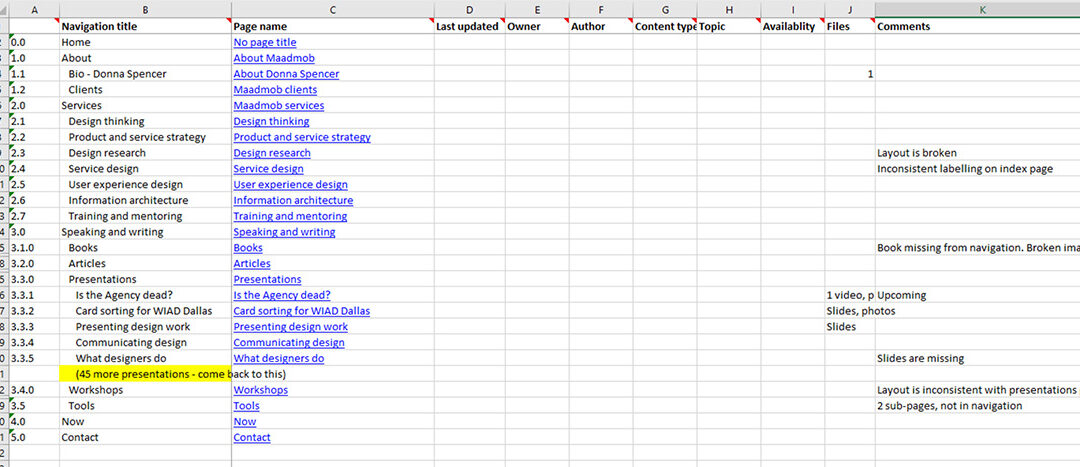
I use this spreadsheets for taking content inventories – a task often done toward the beginning of an information architecture project, and essential for any website or intranet content migration project.

The spreadsheet stores information about each ‘page’ on the website. It is a very handy tool as it allows you to get an understanding of all the content on your website, and see it all at a glance.

Before taking a content inventory, think about what you need to get out of it and what you may use it for in your projects. Think about what information you may need to collect, and only collect that – don’t collect more than you might need – it is just a waste of time and effort.

For most of my projects, I like to collect:

  • Navigation title, page title and URL for every page
  • List of all downloadable files (publications, resources, fact sheets etc)
  • Content relationships – usually the site hierarchy

I often also like to collect:

  • Date last updated
  • Content owner

If you are lucky, your content management system may already have a listing of  file. If you are unlucky, you may have to click through the site page by page.

Files

Notes

The spreadsheet contains instructions for what to include in each column and a set of tips for how to go about filling in the spreadsheet.

The main point to remember is that this is a tool for you to use for your project. You should collect whatever will help you best and represent the information however suits you. The spreadsheet is only a guide.

Screenshots

Content inventory spreadsheet - showing numbering system, navigation title, page title columns

Resources

Articles on how to take a content inventory:

Card sorting analysis spreadsheet

Saturday, December 22nd, 2007

Over the past few years I have been slowly developing and refining a spreadsheet I use for analysis of card sorts. I have used it on many projects and find it invaluable for helping me manage the data and spot patterns.

I use it to analyse results from open card sorts. I have refined it to the point where I’m happy with it, and have prepared instructions for it. The instructions and spreadsheet are completely free for you to use however you wish.

Files

There are four files available:

Notes

Some other random notes:

  • I have done everything I know to make the PDF screen-reader friendly, but please let me know if it isn’t
  • I use a PC and know it works on a PC. I have had mixed response from friends with Macs – for some it works, some it doesn’t. If it doesn’t, please let me know and I’ll explore further

Screenshots

Entering the card names:

spreadsheet card entry

Summary of all cards and standardised categories:

standard_summary.gif

Analysis of categories:

cats_summary_analysis.gif

Visualisation of results:

correlation.gif

Card sorting book

I am currently writing a book on card sorting – check out the card sorting book website.